 LayMesh
Shapes and paths#
Purpose and concepts#
Closed shapes use fill and border_; open lines use line_. path(commands=...) preserves source nodes and segments rather than render subdivisions. Shaft and heads affect ink, while the complete centerline reaches logical endpoints.
Minimal complete example#
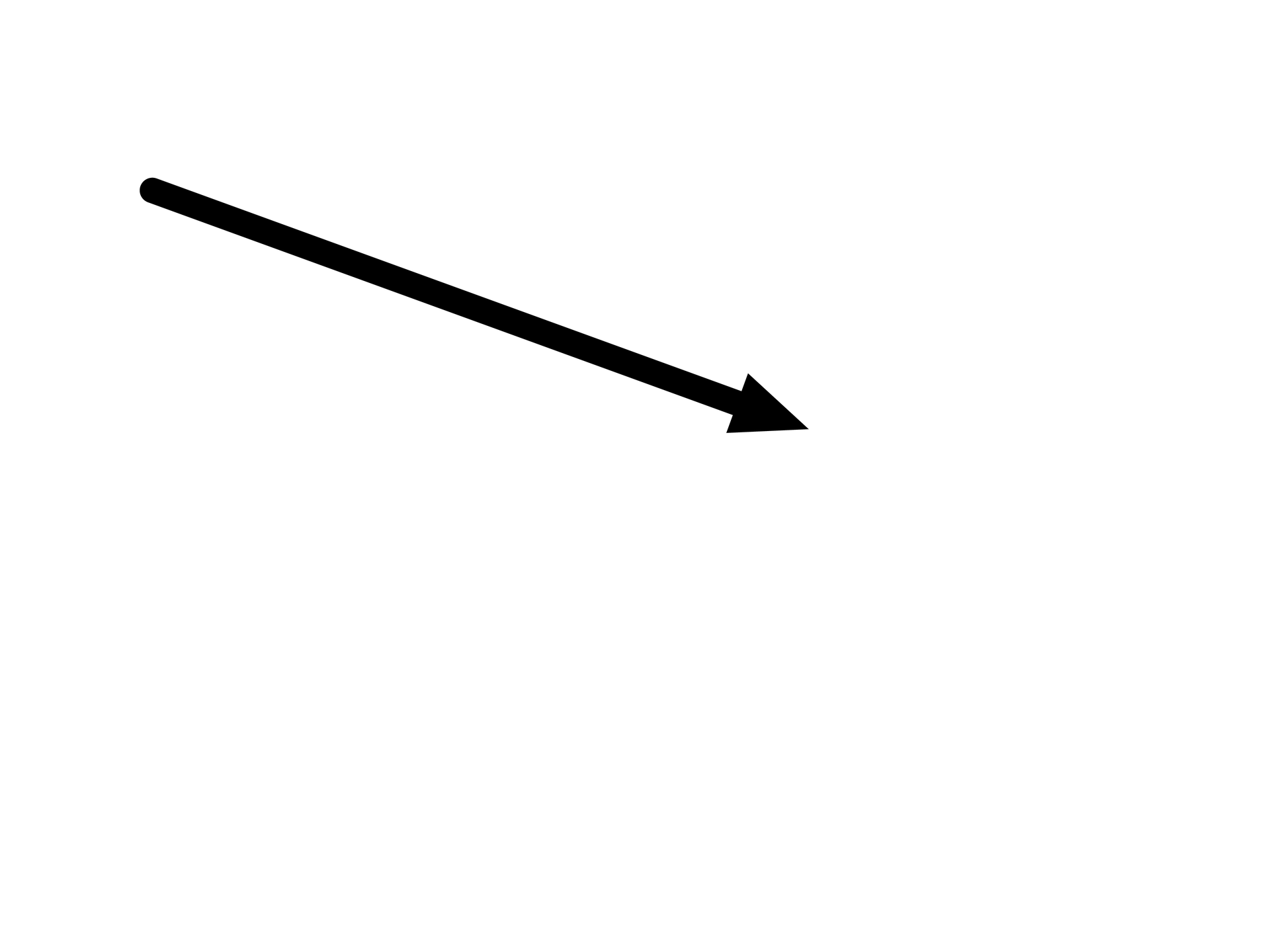
Run this file directly with laymesh validate or laymesh render; it contains its own canvas and required definitions.
# Minimal complete example: linepage=canvas(size=(100mm,75mm),background="#ffffff")page.add(line(length=55mm,angle=20deg,start_cap=round,end_head=head(shape=triangle,size=(6mm,5mm)),line_width=2mm),offset=(12mm,15mm))# Minimal complete example: linepage=canvas(size=(100mm,75mm),background="#ffffff")page.add(line(length=55mm,angle=20deg,start_cap=round,end_head=head(shape=triangle,size=(6mm,5mm)),line_width=2mm),offset=(12mm,15mm))Preview
Dependencies
examples/manual/line.lay
Parameters and default behavior#
Unitless geometry uses the canvas unit; unitless type and stroke sizes use pt. Explicit call parameters override inherited/theme defaults. The linked interface reference lists accepted types, choices and defaults per parameter.
Composition#
Define line with dx/dy or length/angle, never both. start_head points opposite the start tangent and end_head along the end tangent. triangle/open/stealth locate their tip; dot/diamond/bar locate their center. Zero length plus an explicit angle creates standalone heads.
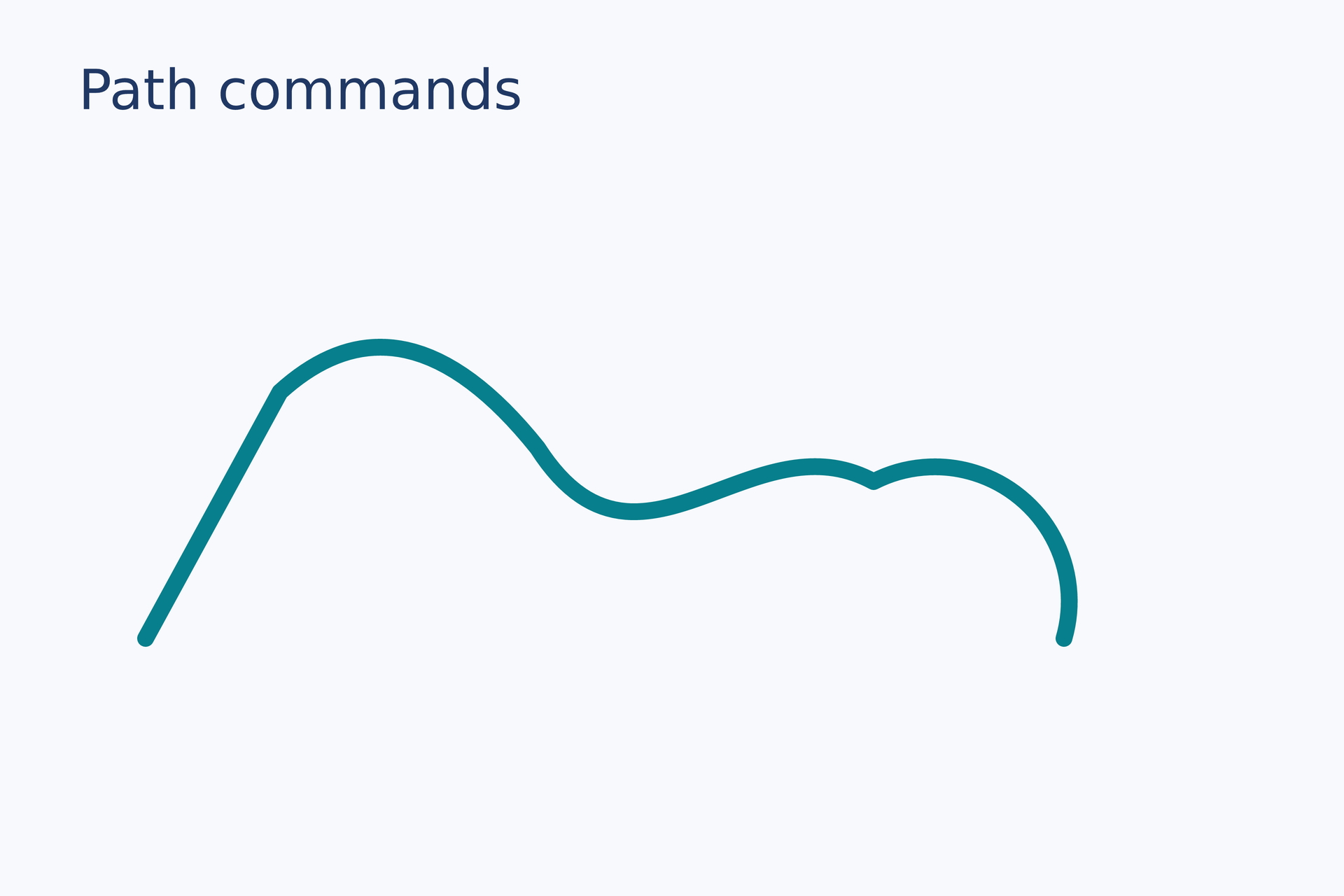
curve = path(commands=[ move_to(0 mm, 27 mm), line_to(12 mm, 5 mm), quad_to(23 mm, -5 mm, 35 mm, 10 mm), cubic_to(44 mm, 24 mm, 54 mm, 7 mm, 65 mm, 13 mm), arc_to(12 mm, 12 mm, 0 deg, false, true, 82 mm, 27 mm)], fill="none", border_color="#087f8c", border_width=1.5 mm, border_cap=round, border_join=round)page.add(curve, target=page.top_left, offset=(13 mm, 31 mm))# Gallery: shapes / path-commandspage = canvas(name="Path commands", size=(120 mm, 80 mm), background="#f7f9fc")font = "DejaVu Sans"heading = text(content="Path commands", font_family=font, font_size=14 pt, color="#203864")page.add(heading, target=page.top_left, offset=(7 mm, 5 mm))# BEGIN DEMOcurve = path(commands=[ move_to(0 mm, 27 mm), line_to(12 mm, 5 mm), quad_to(23 mm, -5 mm, 35 mm, 10 mm), cubic_to(44 mm, 24 mm, 54 mm, 7 mm, 65 mm, 13 mm), arc_to(12 mm, 12 mm, 0 deg, false, true, 82 mm, 27 mm)], fill="none", border_color="#087f8c", border_width=1.5 mm, border_cap=round, border_join=round)page.add(curve, target=page.top_left, offset=(13 mm, 31 mm))# END DEMOPreview
Dependencies
examples/gallery/shapes/path-commands.lay
Common errors and limits#
Closed subpaths reject heads; each open subpath receives its own endpoint styles. Short lines do not shrink heads. Zero-length layout retains cap/head dimension rules while path length remains zero. arrow(...) is removed; migrate to line(...,end_head=head(...)).
Individual functions#
rect#
Create a rectangle material. Set physical dimensions with size, interior paint with fill, the outline with border_*, and rounded corners with border_radius. Place it on the page with add.
Returns: Reusable rectangle material.
Required inputs: size.
Minimal complete source · Composition source · All parameters
ellipse#
Define ellipse material with size=(width,height). fill and border_* control interior and outline; layout corners need not lie on the ellipse.
Returns: material
Required inputs: size.
Minimal complete source · Composition source · All parameters
line#
Create a line using dx/dy or length/angle, with independent endpoint caps and heads. Zero length requires an explicit angle. Heads retain their size on short lines.
Returns: material
Minimal complete source · Composition source · All parameters
path#
Define a path from original move_to/line_to/quad_to/cubic_to/arc_to/close commands. It may contain multiple subpaths; open subpaths support caps and heads.
Returns: material
Required inputs: commands.
Minimal complete source · Composition source · All parameters
polygon#
Define an automatically closed polygon from at least three points. Node order determines traversal; fill_rule controls self-intersecting fills.
Returns: material
Required inputs: points.
Minimal complete source · Composition source · All parameters
polyline#
Define an open polyline from at least two points. line_* controls stroke, start_head/end_head locate at logical endpoints, and line_join controls corners.
Returns: material
Required inputs: points.
Minimal complete source · Composition source · All parameters
arc#
Define an open circular arc with radius/start/end. Page angles point right at 0 and down at 90; caps and heads are supported without closing to a sector.
Returns: material
Required inputs: radius, start, end.
Minimal complete source · Composition source · All parameters
sector#
Define a closed sector by radius and endpoint angles. Fill covers the region between center and arc; border_* controls the outline.
Returns: material
Required inputs: radius, start, end.
Minimal complete source · Composition source · All parameters
star#
Define a closed star with point count, outer/inner radii and rotation. inner_radius must be smaller than outer_radius.
Returns: material
Required inputs: points, outer_radius, inner_radius.
Minimal complete source · Composition source · All parameters
ring#
Define a ring with a transparent inner hole. inner_radius is smaller than outer_radius; the hole reveals underlying paint rather than covering it with background.
Returns: material
Required inputs: outer_radius, inner_radius.
Minimal complete source · Composition source · All parameters
move_to#
Create a command beginning a subpath at x/y without connecting it to the previous one. Use only inside path(commands=...).
Returns: path-command
Minimal complete source · Composition source · All parameters
line_to#
Create a straight segment command from the current node to x/y. A preceding move_to is required; original node/segment identities are retained.
Returns: path-command
Minimal complete source · Composition source · All parameters
quad_to#
Create a quadratic Bezier segment: cx/cy is the control and x/y the endpoint. Controls usually lie off-curve; t differs from arc-length fraction.
Returns: path-command
Minimal complete source · Composition source · All parameters
cubic_to#
Create a cubic Bezier segment from two controls and an endpoint. controls queries retain originals and indices do not depend on render subdivisions.
Returns: path-command
Minimal complete source · Composition source · All parameters
arc_to#
Create an elliptical arc command with radii, rotation, large_arc/sweep flags and endpoint. One command remains one original logical segment.
Returns: path-command
Minimal complete source · Composition source · All parameters
close#
Create a command closing the current subpath to its start while preserving traversal. Closed start/end may coincide; seam-crossing intervals require explicit wrap=true.
Returns: path-command
Minimal complete source · Composition source · All parameters
head#
Reusable endpoint head configuration, not a placeable material. size gives along-direction and transverse physical dimensions.
Returns: head
Minimal complete source · Composition source · All parameters
Detailed behavior and further examples#
Parameters#
| Parameter | Purpose | Default or requirement |
|---|---|---|
path |
Path commands and coordinates | Coordinates use length units |
fill_rule |
Fill rule | nonzero / evenodd |
Common usage#
Use rect, ellipse, polygon, polyline, path, line for vector materials. Path coordinates use physical units; fill rules control overlapping areas and holes. Fusion requires already placed vector instances in the same container.
Limits and related topics#
Image import and cropping · Text and fonts · Resource paths · Mathematical formulas · Fills, gradients and outlines
Line direction and endpoint styles#
arrow(...) has been removed. Use line(...,end_head=head(...)). Editors report the migration and offer a fix for safely identifiable builtin calls.
page.add(line(length=40mm,angle=30deg,line_width=1mm, start_cap="round",end_head=head(size=(5mm,4mm))),offset=(10mm,20mm))page.add(line(length=0mm,angle=30deg,end_head=head(size=(5mm,4mm))),anchor=self.path.end,offset=(60mm,20mm))Choose either dx/dy or length/angle. Length is nonnegative; nonzero length defaults to zero degrees, while zero length requires an explicit angle. Zero degrees points right and 90 degrees down. Angles accept deg/rad or unitless degrees.
line, polyline, open path and arc share start_head/end_head and start_cap/end_cap. Caps are butt/round/square and inherit line_cap for line/polyline/arc, or border_cap for path; internal dash caps retain that base setting. Head shapes are triangle/open/stealth/dot/diamond/bar. size gives longitudinal and transverse dimensions; dot is an ellipse and bar a rectangle. Triangular, open and stealth heads use their tip as the endpoint; other shapes use their center. Set fill, border_color, border_width and opacity independently.
Default head length is max(4×stroke width,1.5mm), and width is max(0.9×head length,stroke width). Closed heads inherit the line color without an outline; open heads inherit outline color and width, with no fill. Short and zero-length lines retain full head size; ink.bounds includes the actual region. Zero length has no shaft; without heads, round/square caps may draw a dot or square.
A zero-length line uses its head or cap geometry for its layout frame, independently of opacity. A headless butt cap reserves a stroke-width layout frame without producing ink. Start and end remain coincident, with zero arc length. Use anchor=self.path.end to align that point to the target and keep it fixed when changing head size.
The logical path retains its full centerline: pointed tips coincide with start/end, and the stroke enters the head interior. An endpoint envelope clips exposed stroke near each tip after constructing the complete stroke; the shaft is not shortened to its first centerline intersection. Dot, diamond and bar heads remain centered on the endpoint. Overlap uses the head paint, with equal paints unioned to prevent dark translucent seams. Closed hollow heads keep an empty interior; open V heads retain the interior shaft. Curve heads use one-sided endpoint tangents and diagnose undefined direction. Each open subpath receives the endpoint style; decorated paths containing closed subpaths are rejected.
workflow#
Complete sources and executable verification fixtures for this workflow are listed in the feature coverage map. Follow this page’s input conditions and limits when composing features.