 LayMesh
Shadows and effects#
Style manual · Next: Compatibility and troubleshooting
Three CSS shadow types#
| Effect | Shape |
|---|---|
| box-shadow | Layout border box, including transparent objects and elliptical content |
| text-shadow | Text or formula content alpha |
| filter:drop-shadow(...) | Rendered content alpha; currently one drop-shadow |
.card { box-shadow:1mm 2mm 3mm 0mm #0004; }.title { text-shadow:0.5mm 0.5mm 1mm #0006; }.cutout { filter:drop-shadow(1mm 1mm 1mm #0005); }Box shadow fields are x/y offsets, blur radius, spread and color. Offsets are required; blur and spread may be omitted; omitted color uses currentColor. Text shadows and drop-shadow do not accept spread or inset.
Layers, inset and negative spread#
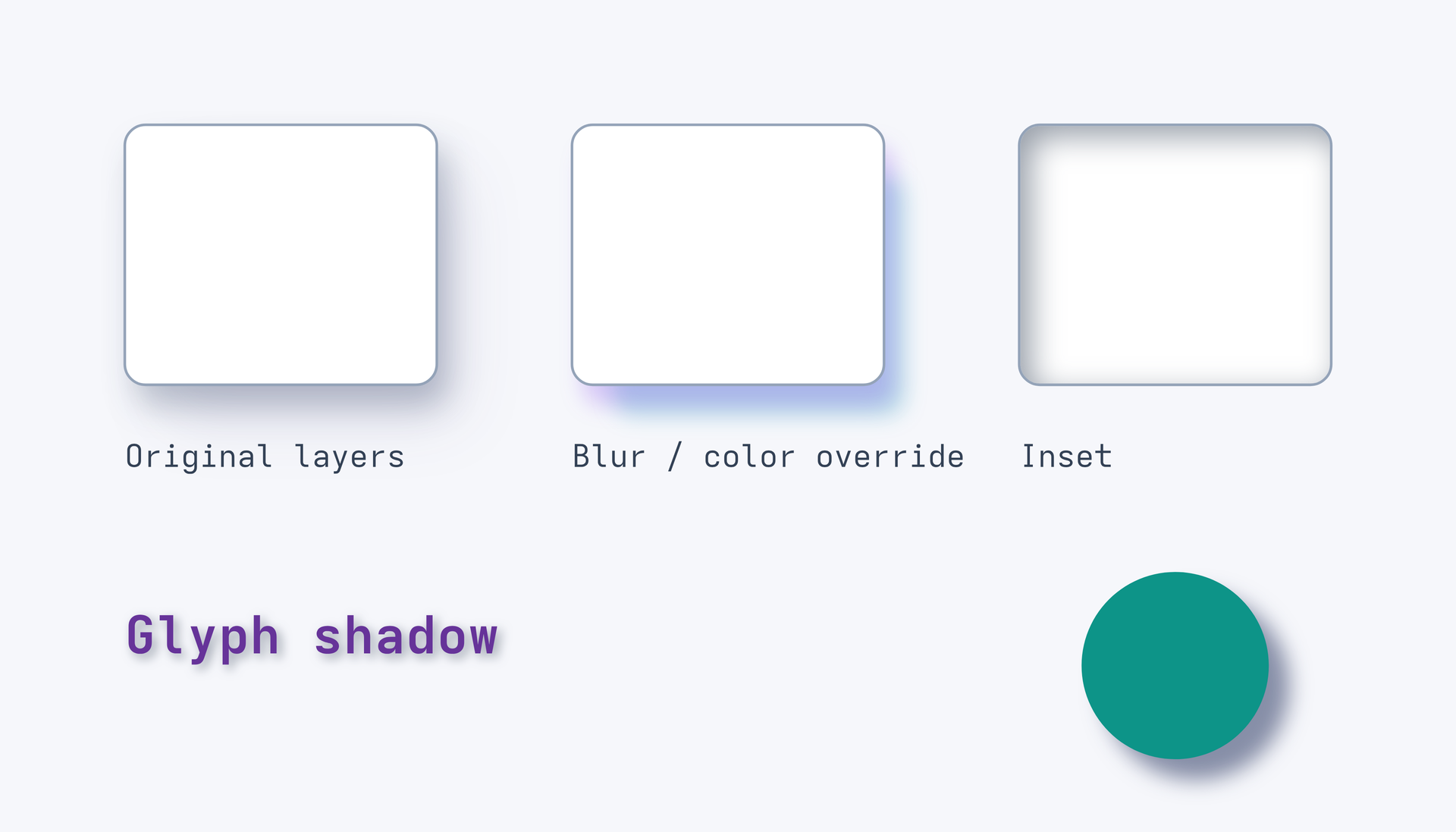
.card { box-shadow:1mm 2mm 3mm #192c4e40, 3mm 4mm 6mm -1mm #2e2a6820;}.inset { box-shadow:inset 1mm 1mm 3mm #33415580; }Commas create layers, first on top. Positive spread expands and negative spread contracts. Outer shadows remove the box interior; inset shadows sit above the background and below content/border. Effects follow group transforms and clipping; the canvas can crop overflow.
page=canvas(size=(140mm,80mm),background="#f6f7fb")style { .card { background-color:white; border:0.25mm solid #94a3b8; border-radius:2mm; box-shadow:1mm 2mm 3mm #192c4e40,3mm 4mm 6mm -1mm #2e2a6820; } .card.tuned { box-shadow-blur:2mm; box-shadow-color:#7c3aed40,#0891b240; } .card.inset { box-shadow:inset 1mm 1mm 3mm #33415580; } .label { color:rebeccapurple; font-size:5mm; font-weight:700; text-shadow:0.4mm 0.4mm 1mm #33415580; } .drop { background-color:#0d9488; filter:drop-shadow(2mm 2mm 1mm #17255480); }}cards = []for appearance,label in [("card","Original layers"),("card tuned","Blur / color override"),("card inset","Inset")] { target = page.top_left gap = (12mm,12mm) if len(cards) > 0 { target = cards[len(cards)-1].top_right gap = (13mm,0mm) } item = page.add(rect(size=(30mm,25mm),class=appearance),target=target,offset=gap) cards = append(cards,item) page.add(text(label,font_size=3mm,color="#334155"),target=item.bottom_left,offset=(0mm,5mm))}page.add(text("Glyph shadow",class="label"),target=cards[0].bottom_left,offset=(0mm,21mm))page.add(ellipse(size=(18mm,18mm),class="drop"),anchor=top_center,target=cards[2].bottom_center,offset=(0mm,18mm))Preview
Dependencies
examples/gallery/styles/layers.lay
partial-overrides#
Change only an imported shadow's blur radius:
@import "@laymesh/bootstrap.css";.shadow.custom { box-shadow-blur:2mm !important; }class="bg-primary rounded shadow custom" preserves offsets, spread, color and existing layers. Bootstrap's important shadows require an important and more specific override.
| Intention | Declaration |
|---|---|
| 2mm blur radius | box-shadow-blur:2mm |
| Expand by 2mm | box-shadow-spread:2mm |
| Offset right/down by 2mm | box-shadow-offset:2mm 2mm |
| Change color | box-shadow-color:#0d6efd66 |
| Make inset | box-shadow-position:inset |
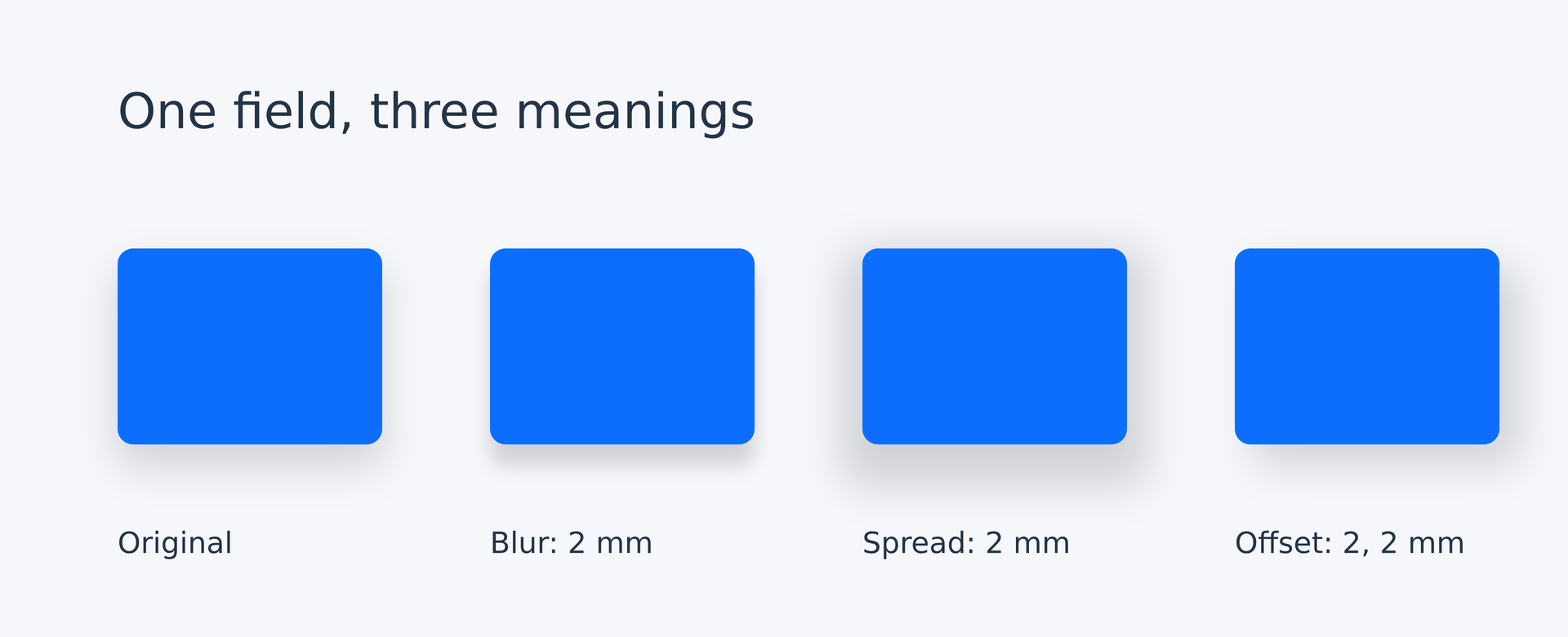
From left to right: the library's original shadow, only blur changed to 2mm, only spread changed to 2mm, and only x/y offset changed to 2mm. Each variant changes one field and preserves color and the other fields. Edit the complete source to compare them.
# The same Bootstrap shadow; each variant changes one field only.page = canvas(size=(160mm,65mm), stylesheet="@laymesh/bootstrap.css", background="#f6f7fb")style { .caption { font-size:3mm; color:#243447; } .heading { font-size:5mm; color:#243447; } .shadow.blur { box-shadow-blur:2mm !important; } .shadow.spread { box-shadow-spread:2mm !important; } .shadow.offset { box-shadow-offset:2mm 2mm !important; }}heading = page.add(text("One field, three meanings",class="heading"),target=page.top_left,offset=(12mm,8mm))variants = [("","Original"),("blur","Blur: 2 mm"),("spread","Spread: 2 mm"),("offset","Offset: 2, 2 mm")]cards = []for modifier,label in variants { target = heading.bottom_left gap = (0mm,11mm) if len(cards) > 0 { target = cards[len(cards)-1].top_right gap = (11mm,0mm) } item = page.add(rect(size=(27mm,20mm),class="bg-primary rounded shadow "+modifier),target=target,offset=gap) cards = append(cards,item) page.add(text(label,class="caption"),target=item.bottom_left,offset=(0mm,6mm))}Preview
Dependencies
examples/gallery/styles/shadow-parameters.lay
These longhands follow the CSS Borders Level 4 working draft, which remains a work in progress. The following rules describe the current LayMesh implementation. One value applies to all existing layers; comma lists apply per layer and shorter lists repeat. Blur alone creates no shadow. A single offset preserves layer count; an explicit offset list can set it. One length sets both x/y, and none disables that layer.
A new box-shadow resets its components; box-shadow:none clears shadows. Important longhands still participate in the cascade and cannot be overridden by an ordinary shorthand.
# Keep reusable imports and local overrides in theme.lcss.page = canvas(size=(80mm,50mm), stylesheet="theme.lcss")page.add( rect(size=(30mm,20mm), class="bg-primary rounded shadow custom"), anchor=center, target=page.center)/* Shared offline libraries; nothing is automatically imported. */@import "@laymesh/bootstrap.css";@import "@laymesh/open-props.css";@import "@laymesh/animate.css"; /* Local appearance and motion follow the same cascade. */.custom { animation-duration: 2s; }.shadow.custom { box-shadow-blur: 2mm !important; }Preview

Dependencies
examples/manual/css-shadow-override.layexamples/manual/theme.lcss
Blur and the existing effects stack#
CSS box/text blur radius is divided by two for Gaussian sigma: 2mm blur corresponds to sigma=1mm. The third drop-shadow length directly specifies sigma.
effects=[shadow(...),glow(...)] is a separate ordered LayMesh stack with its existing target, order and blur semantics. shadow(blur=2mm) uses sigma=2mm and requires nonnegative spread. Box-shadow longhands do not edit this stack. See Artistic text and effects.
Export and budgets#
SVG, PNG and PDF use the same effect definitions. PDF subjects remain vector while blurred effects rasterize locally. Export DPI affects raster detail without changing millimeter lengths. Existing pixel and memory limits still apply; reduce affected area or relevant raster density when a budget error occurs.